

Weather Forecast
TOH Talent Team
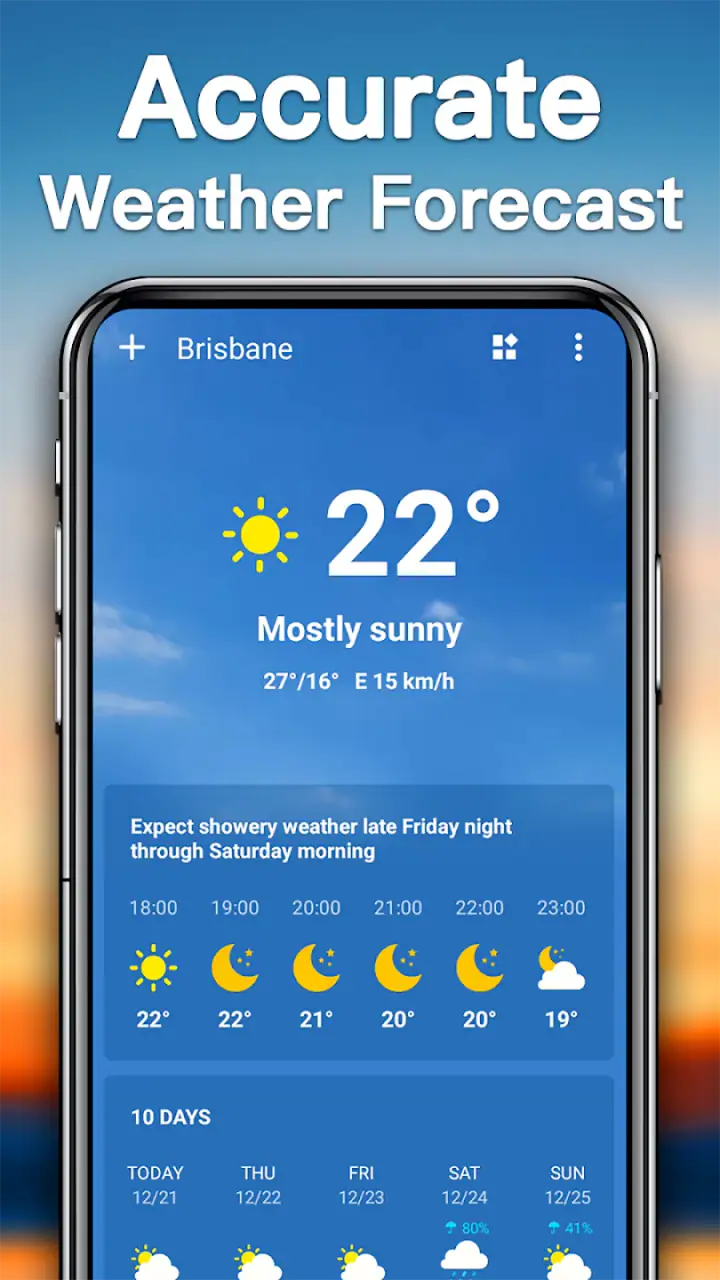
I use weather apps for small decisions that become annoying when they go wrong: whether to cycle to work, when to leave for an appointment, or if a weekend walk needs a backup plan. Weather Forecast, developed by TOH Talent Team, is aimed at that everyday job rather than turning the forecast into a complicated technical dashboard. It is a free weather app for everyone, and its focus is straightforward: current conditions, radar, and forecasts covering today, tomorrow, and the next seven days.
After spending time with it, I see the appeal. The app is easy to approach, the information is arranged for quick checking, and the radar gives the forecast a more visual side than a simple temperature card. It is not the kind of tool I would choose for professional meteorological analysis, but it can be a practical companion for ordinary planning. My overall impression is that it works best when I want an answer quickly and do not want to dig through layers of menus.
How Weather Forecast feels in everyday use
A quick start without a steep learning curve
The first thing I notice about Weather Forecast is how little effort it asks from me. A weather app should not make me study its interface before I can understand whether rain is approaching. This one is built around familiar information: what is happening now, what is likely tomorrow, and how the next week looks. That makes it suitable for someone who wants a practical forecast rather than a collection of specialist charts.
The current version is 14.0, and the app has been available since March 15, 2017. That long presence matters to me because it suggests this is not a brand-new experiment that may disappear after a short period. The developer, TOH Talent Team, has had time to shape the product into a recognizable weather tool, while the current release indicates that it remains maintained as an active app.
Its store summary emphasizes weather radar alongside forecasts, and that combination is important. A forecast tells me what may happen over a period, while radar helps me judge what is happening around me right now. Those are different questions. If I am deciding whether to leave the house in ten minutes, a radar view can be more useful than a distant-looking hourly prediction.
Related News

Instagram Is No Longer a Photo App. It Is an Attention Engine

Microsoft Teams Mobile: When Collaboration Becomes Navigation

How the NFL App Adapts to Android and iOS Updates

Temu: Elevate Your Shopping Experience to Billionaire Status

Why Traffic Rider Works Best as a Precision Reflex Game

How Google’s Find Hub Transforms Everyday Searches
Speed expectations: useful when I need a fast glance
Weather Forecast feels designed for short visits. I can open it with a specific question in mind, scan the current conditions, and move on. That is a better fit for daily use than an app that surrounds a simple forecast with too many panels, articles, or decorative elements. The practical advantage is not that it replaces careful planning; it is that it reduces the time needed to begin planning.
I would still separate perceived speed from forecast quality. An app can present information quickly, but weather itself remains uncertain, especially several days ahead. I treat the seven-day view as a broad planning guide rather than a promise. For tomorrow’s commute or a dinner later today, the forecast is more immediately useful. For an event at the end of the week, I would check again closer to the time.
One useful habit is to look at the radar before relying on the daily summary. If the sky is changing quickly, the broad forecast may not communicate the timing of a passing shower as clearly as the visual movement on the map. This is one of the app’s more valuable workflows: use the forecast to understand the general day, then use radar to make a near-term decision.
Gallery
Heavy-use moments: where the app earns its place
The app becomes most useful during days when the weather is changeable. On a calm day, I may only need the temperature and a general outlook. When rain bands are moving through, however, I want to know whether I should leave now, wait a little, or take a coat and accept the inconvenience. The radar view gives me another layer of context instead of forcing me to trust one headline condition.
It also works well for repeated checks before going outside. I might look at the current weather in the morning, compare it with tomorrow before making a plan, and return later to see whether the next seven days still look suitable for an outing. Those checks are different in purpose, so having them in one weather app is more convenient than switching between a basic phone widget and a separate radar service.
For travel within a familiar area, the app can help me make sensible short-term choices. If I am walking to a station, taking children to a park, or deciding whether to carry a laptop in a bag that is not waterproof, the combination of immediate conditions and radar is more useful than a single temperature number. I would not treat it as a guarantee, but it improves the decision I can make with limited time.
A realistic morning scenario
Imagine a weekday morning with a work meeting across town. I open the app before leaving and check the current conditions first. The seven-day forecast is not relevant yet; I need to know what the next part of the morning may feel like. I then inspect the radar because a short shower could affect whether I walk, cycle, or use public transport.
If the radar suggests unsettled conditions, I can leave earlier, pack a light layer, or choose a route with more shelter. Before returning home, I can check tomorrow’s outlook and decide whether to wash clothes, plan an outdoor errand, or move it to another day. That is the kind of modest but repeated usefulness I value here. The app does not make the decision for me; it puts the relevant information in front of me quickly enough to make the decision myself.
Reliability is more than a clean screen
A weather app needs to feel dependable in two ways. It should open and present its information consistently, and the information should be clear enough that I understand what I am seeing. Weather Forecast succeeds more on the second point than on any promise of perfect prediction. Its straightforward presentation makes it less likely that I will confuse a broad outlook with a precise guarantee.
The public response is also encouraging. Weather Forecast has a 4.7 average from around 183 thousand ratings, with roughly 4.4 thousand written reviews. It has passed 10 million installs, which gives it a substantial user base for a weather app. Those figures do not prove that every person will have the same experience, but they do show that the app has earned sustained attention from a large number of users.
I remain cautious about interpreting a high rating as proof of accuracy in every location. Weather conditions vary by region, and forecast usefulness can depend on local coverage and rapidly changing conditions. My approach is to judge the app by how clearly it helps me interpret the information, then keep a little common sense when the forecast is uncertain. A clean interface is valuable, but it cannot remove the limits of prediction.
Recovery after interruptions and repeated checks
Weather apps are often opened in imperfect situations: while I am in a hurry, moving between networks, or checking conditions several times during a storm. In those moments, I care about whether the app gets me back to the information I need without making the task feel heavier. Weather Forecast’s simple purpose works in its favor because there are fewer kinds of information I need to rediscover after an interruption.
I also prefer to reopen the app rather than leave it running continuously. That habit keeps weather checking intentional and avoids treating a long-range forecast as something that should be watched every minute. For a normal routine, I would check before leaving, check again if conditions change, and close it. During unsettled weather, the radar becomes the part worth revisiting.
There is a trade-off here. A focused app can feel calmer than a feature-packed weather platform, but someone who wants extensive historical data, specialist atmospheric layers, or highly detailed alerts may find the experience too limited. Weather Forecast is strongest when recovery means returning to the basics, not when recovery means rebuilding a complex monitoring setup.
Device constraints and what they mean in practice
Weather Forecast supports Android devices running version 6.0 or later. That gives it a broad compatibility range, including older phones that may not run newer apps comfortably. For users keeping an older device alive, this is a practical advantage: a weather app should not require a recent flagship simply to display a forecast and radar.
At the same time, older hardware can affect the overall feel of any app, especially when a visual radar view is involved. I would expect a newer phone to handle transitions and map interaction more comfortably than an aging budget device, but I would not assume that every phone will behave identically. If your device already struggles with map-heavy applications, the radar portion is the area I would pay attention to first.
Resource demands also depend on how I use the app. Opening it for a quick forecast is a lighter routine than repeatedly exploring radar views while traveling or during unsettled weather. I would avoid leaving any weather app open unnecessarily, particularly on a device with limited battery capacity. The sensible workflow is to check the information, make a decision, and close the app when the decision is made.
The Everyone content rating makes it suitable for a broad household audience. That is useful if several people share a tablet or if I want a simple weather tool for a family member who does not enjoy complicated interfaces. The app’s free price also removes the need to commit financially before deciding whether its presentation suits my habits.
Where it compares well with usual alternatives
The usual alternative is the weather panel already built into a phone. That option is convenient because it is always close at hand, but it may not offer the same emphasis on radar and a broader forecast view. Weather Forecast is more worthwhile when I want to move beyond a single glance at the current temperature and see how conditions may develop across the day and week.
Another alternative is a specialist weather service with many technical layers. Those apps can be better for users who want detailed meteorological information, advanced charts, or deeper customization. The cost is often a busier experience and a longer learning curve. I would choose Weather Forecast instead when clarity matters more than exhaustive detail, especially for family plans, commuting, errands, and casual outdoor activities.
There is also the option of using a web browser. A browser can provide access to several weather sources, but it adds friction when I only want to know whether to take an umbrella. A dedicated app is more convenient for repeated checks because the task is already framed around weather rather than a general search. That convenience is the main reason I would keep this app installed alongside, rather than instead of, a more specialized service.
Three practical habits that improve the experience
First, I use the seven-day forecast for scheduling, not precision. It is helpful for spotting a promising day for an outdoor plan or noticing a stretch of unsettled weather. I do not use it to decide that a specific hour several days away will definitely be dry. This simple distinction prevents disappointment and makes the longer view genuinely useful.
Second, I treat radar as a timing tool. Instead of opening it merely because it is available, I use it when the question is whether weather is moving toward me or passing by. That makes the visual view more actionable. It is especially helpful before walking, cycling, taking a child outside, or carrying something that should not get wet.
Third, I compare the app’s information with the actual sky when the situation is marginal. If conditions are changing quickly, I do not let a reassuring icon overrule dark clouds, strong wind, or visible rain nearby. The app helps me prepare; it should not replace observation. This is a small but important trade-off for any forecast tool, including this one.
Who should use it, and who should skip it
I would recommend Weather Forecast to someone who wants a free, approachable weather app with radar and several forecast horizons. It suits commuters, families, casual travelers, walkers, cyclists, and anyone who checks the weather before ordinary plans. It is also a sensible option for an older Android phone because it supports Android 6.0 and newer.
I would be less enthusiastic for a user who needs professional-grade weather analysis or a highly specialized monitoring workflow. If your decisions depend on detailed atmospheric interpretation, extensive historical comparisons, or advanced alert configuration, a more technical weather service may be a better fit. The app’s strength is its accessible balance, not maximum depth.
I would also skip it if you want weather information to disappear into a tiny widget and never open a dedicated app. The built-in phone forecast may be enough for that habit. Weather Forecast earns its place when I want to look beyond the smallest summary and use radar or the longer outlook as part of a decision.
My performance verdict
Weather Forecast feels most successful as a quick, practical weather companion. Its perceived speed comes from keeping the task focused, while its radar gives it more value than a bare current-condition display. The seven-day view supports broad planning, and the current forecast helps with immediate choices. I appreciate that the app can serve both a quick glance and a more deliberate check without forcing me into a technical interface.
Its limitations are equally clear. Forecasts remain forecasts, radar is most useful when I know how to interpret it, and users seeking deep meteorological tools may outgrow the app. Older devices may also provide a different experience when handling visual weather information. Those are not reasons to dismiss it; they simply define the situations in which another option would be better.
For my everyday needs, the balance is convincing. The free model, Everyone rating, broad device support, and established audience make it easy to try, while the combination of immediate conditions, radar, tomorrow’s outlook, and the next seven days gives me enough range for normal planning. If you want a weather app that helps you decide what to do next without making weather feel like homework, this is a strong choice.
I would install Weather Forecast for commuting, errands, short trips, and changing outdoor plans, while keeping my expectations realistic during uncertain conditions. It is not the most specialized weather instrument, and it does not need to be. In my experience, its value comes from making the information I actually use easy to reach, then getting out of the way so I can act on it.
FAQs for Weather Forecast
What features does the Weather Forecast app offer?
The Weather Forecast app provides real-time weather updates, detailed forecasts, radar maps, severe weather alerts, and customizable widgets. Users can check hourly and 7-day forecasts, as well as access data on humidity, wind speed, and UV index. The app also offers location-based services, ensuring accurate weather updates wherever you are.
Is the Weather Forecast app free to use?
The Weather Forecast app is free to download and use. However, it offers in-app purchases for premium features such as ad-free experience, advanced radar tools, and extended forecast data. Users can choose to subscribe to these features for a monthly or annual fee, depending on their needs.
How accurate is the weather data in the app?
The Weather Forecast app sources its data from reputable meteorological services and uses advanced algorithms to ensure high accuracy. While no app can guarantee 100% accuracy due to the dynamic nature of weather, users generally find its predictions reliable and precise for planning daily activities or trips.
Does the app require an internet connection?
Yes, the Weather Forecast app requires an internet connection to update weather data and provide real-time forecasts. Users should be connected to Wi-Fi or have mobile data enabled. However, the app can store previously downloaded data for offline viewing in case of connectivity issues.
Is my location data secure with the Weather Forecast app?
The Weather Forecast app prides itself on user privacy and security. It uses location data solely to provide accurate weather forecasts and does not share this information with third parties without consent. The app complies with all relevant data protection regulations to ensure user information is kept secure.
Pros
- Accurate and real-time weather updates.
- User-friendly interface with intuitive navigation.
- Customizable alerts for severe weather.
- Detailed hourly and weekly forecasts.
- Supports multiple locations for tracking.
Cons
- Ads can be intrusive at times.
- Limited offline functionality.
- Some features require a subscription.
- Occasional app crashes reported.
- Battery usage can be high.


